Here are some of the more noteworthy things available in milestone build M7
(May 2, 2014) which is now available for download.
We also recommend to read the Tips and Tricks, either via Help > Tips and Tricks... or online for
Platform,
JDT, and
PDE.
| Platform |
| Improvements in the dark theme |
The dark theme has been customized to work better on Window, Linux and Mac.
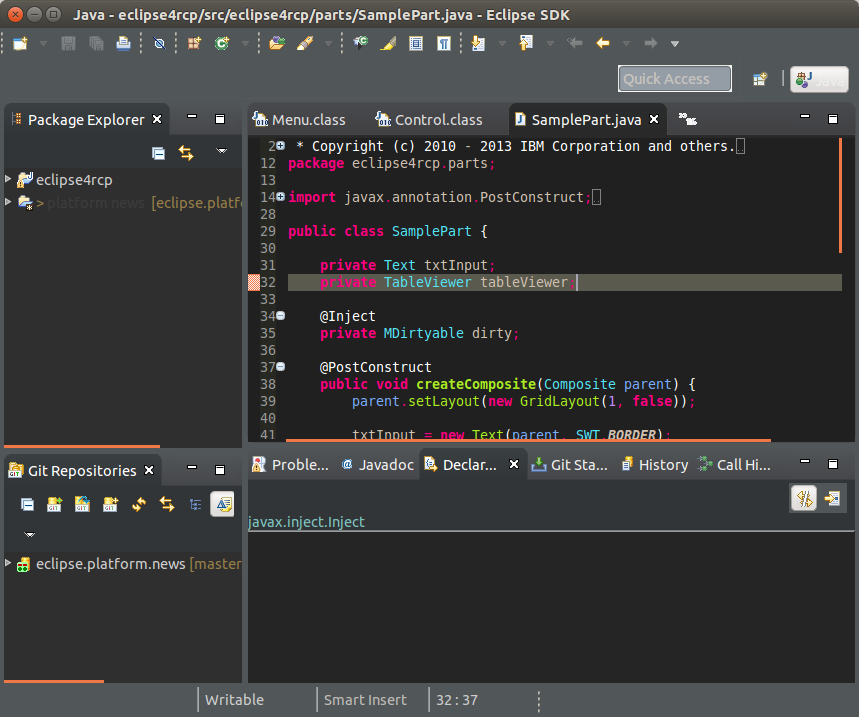
The platform also supports that projects can extend existing themes like the dark theme with settings for fitting
syntax coloring. See bug 433475 for details.
|
| Platform icons converted to png files |
Based on a community contribution, lots of of the existing GIF icons in the Eclipse platform have been replaced by PNG files. This makes Eclipse icons look better on a dark background, as
for example the toolbar on Mac OS X or on a dark theme.

|
| Ubuntu menu integration |
In cooperation with Canonical, the Platform team worked on the support of Eclipse in Ubuntu 14.04. Ubuntu 14.04 supports the Eclipse 4 menu implementation, which had issues
in Ubuntu 13.04 and 13.10. For more details, see bugs Eclipse menu does not render correctly in unity bar and Eclipse menus doesn't show up in Saucy.
|
| Model dynamics - perspectives |
The renderer of the application model supports now that the icons of perspectives are exchanged at runtime. Such a change is immediately reflected in the user interface.
|
| EMenuService released as API |
The EMenuService service has been released as API. RCP clients must adjust their package imports to org.eclipse.e4.ui.services.
|
| Improved OSGi integration |
Eclipse implementations can retrieve the OSGI BundleContext via an extended object supplier and the @Inject @OSGiBundle annotations.
|
| Platform code improvements |
During the last milestones, the platform team has invested in cleaning up the existing codes basis to simplify contributions by new and existing contributors.
For more details, see bug 420779.
During this update, several plug-ins have been upgraded to require Java 1.6 instead of Java 1.4 or Java 1.5.
|
| New filesystem fragment for Java 7 API |
A new filesystem fragment supporting Java 7 file API has been added. The
new fragment named org.eclipse.core.filesystem.java7 allows
to retrieve information about files like attributes, file length,
permissions, etc. on operating systems that already have JRE supporting
Java 7 API but don't have any native Eclipse filesystem fragment. There are three
different types of filesystems supported:
- DOS/Windows filesystems,
- POSIX compliant filesystems, and
- filesystems that are neither DOS/Windows nor POSIX compliant.
The new fragment will be loaded and used automatically when you run
Eclipse with JRE 7 or newer and no native filesystem fragment applicable
for your operating system can be found.
|
Set text direction for the StyledText widget on Windows |
The StyledText widget now supports setting the text direction via the
setTextDirection(int) API on the Windows platform. The setTextDirection
(int) and getTextDirection () APIs are also added to TextLayout
(implemented only on Windows currently).
|
| SWT applications will not be grouped together in the Windows taskbar by default |
SWT does not initialize the AppUserModelID (which is used by Windows for taskbar grouping)
to "SWT" by default anymore. SWT applications which desire to be grouped together in the
Windows taskbar should set an appropriate application name before creating the
Display object as shown below:
Display.setAppName("APP_NAME"); // APP_NAME will used as AppUserModelID
Display display = new Display();
|
| JDT |
| Java 8 |
Java™ 8 is here, and JDT fully supports it:
|
| PDE |
| Java 8 support for API Tools complete |
API Tools now has full support for Java 8. This includes illegal use, binary comparisons, restriction validation (for both
javadoc tags and annotations), and completion proposals. Support has been added for the following code structures:
- Default Methods
- Type Annotations
- Lambda Expressions
- Method References
There is also a new JavaSE-1.8 execution environment fragment available. Update the API Tools Execution
Environment Descriptions feature. API tools now uses the 5.0.1 release of ASM to read Java 8 class files.
|
| Product can add p2 update sites |
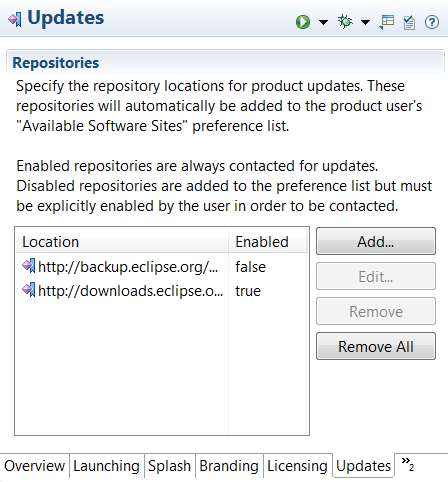
A new page has been added to the Product Editor where you can add p2 repository update sites. When your product
is exported, the list of update sites will be added to the repository list that p2 uses to check for updates. You can
set a site as disabled to have it visible on the Install/Update > Available Software Sites preference page, but it
will not be used during install/update operations unless the user enables it first.
|
| Product can define custom default start levels |
On the Configuration page of the Product Editor, there is a new button: Add Recommended.... When pressed,
a dialog will open offering to add a list of recommended custom start levels to your product definition. This is helpful
for new product developers as they may not be aware that some plug-ins require custom start levels to function correctly. The
operation will not overwrite any existing custom start levels you have set previously.
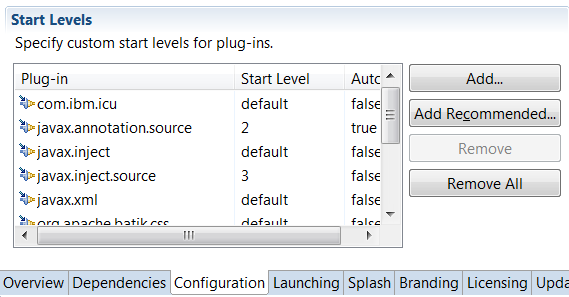
This is the list of recommended start levels currently provided:
org.eclipse.core.runtime@start
org.eclipse.equinox.common@2:start
org.eclipse.equinox.ds@2:start
org.eclipse.equinox.event@2:start
org.eclipse.equinox.simpleconfigurator@1:start
org.eclipse.equinox.p2.reconciler.dropins@start
|
| Launch configurations don't select unbound execution environment |
When creating a new launch configuration, PDE examines the list of plug-ins to be launched and selects the lowest
execution environment (EE) that supports each plug-in's required EE. However, this could lead to selecting an EE
that no installed JRE matches. With no bound JRE, launching with that execution environment would always fail.
Now, when choosing an execution environment, any plug-in that requires an unbound EE will be ignored.
|
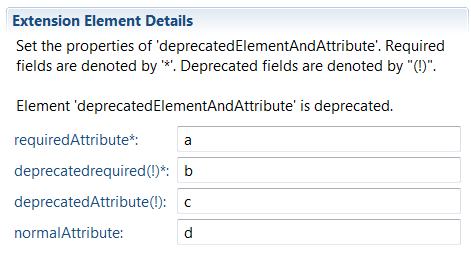
| Plug-in editor indicates deprecated extension elements |
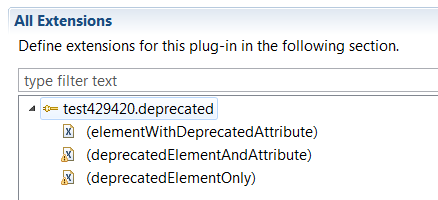
When editing the extensions of a plug-in, you now have a visual indication that an extension element or attribute
has been deprecated.
- Icons in the tree are marked with a warning decoration:
- Menu items are marked with (deprecated):
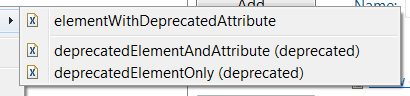
- Details of elements include deprecation information and deprecated attributes are marked with (!):
|
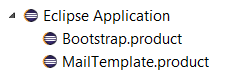
| New eclipse launcher icons |
PDE has a new set of icons used in preference pages, launch configurations and editors. These new icons match the new platform icons.
|
| PDE Build depends on org.eclipse.update.configurator |
PDE Build now has a non-optional dependency on org.eclipse.update.configurator [3.1.0,4.0.0). Functionality
from that bundle is required by PDE Build and previously was added via an optional dependency on org.eclipse.core.runtime.compatibility.
If this optional dependency was missing, PDE Build or PDE UI operations could fail with cryptic errors.
|
| |
The above features are just the ones that are new since the previous milestone
build. Summaries for earlier Luna milestone builds:

