Eclipse Project 4.3 M4 - New and Noteworthy

Here are some of the more noteworthy things available in milestone build M4 (December 14, 2012) which is now available for download.

Platform
Performance enhancements Significant performance enhancements have been made in the Platform user interface in this milestone. In particular, some applications that were experiencing slow editor opening, closing, and switching are now much faster. Editor selection changes and the Open Resource dialog have also been made faster. A number of leaks have been addressed to avoid long-running applications don't run out of memory.

Speedometer
Photographer: YtseJam Photography / Creative Commons Attribution 2.0

SWT for GTK3 32-bit and 64-bit GTK3 have joined the lineup of supported configurations for which SWT and Eclipse are routinely built. This implementation is currently early access. Everyone is encouraged to download and test these new builds, and to log bugs in bugzilla.

Note to load the SWT GTK3 libraries, you must set an environment variable SWT_GTK3 prior to starting Eclipse. (ex. export SWT_GTK3=1)

GTK3 Control Example

Support for the Ant augment task The Ant editor now has support for the Ant augment task. More information about the augment task can be found on the Apache help site here.
JDT
Paste direct to a new stacktrace console Previously, when creating a new Java stacktrace console, you would have to select and delete the default text prompting you to paste a stacktrace. In 4.3M4 you can simply paste the stacktrace in and the default text will be auto-deleted for you.
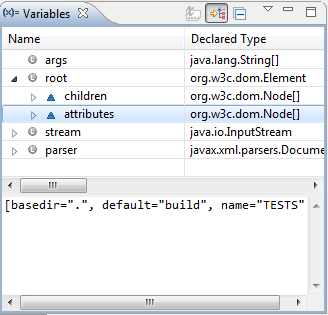
XML DOM logical structures JDT now provides a default logical structure for XML DOMs, which can be used during debugging to view the children and attributes of a node as simple arrays.

Variables view showing the XML DOM logical structure

Quick assist to combine Strings The new Combine to single String quick assist (Ctrl+1) replaces String concatenations with a single String literal.

String s = "Delete " + "two" + " files?" // becomes: String s = "Delete two files?"

Option to inherit null annotations JDT has a new option controlling how to interpret null annotations in the presence of inheritance. This should facilitate the migration towards null annotations in projects with mixed code ownership.

For the sake of code readability, JDT expects null annotations of an overridden method to be repeated in overriding methods. In the following example the analysis normally complains that arg is not annotated in ClientClass, which means, this class doesn't formally conform to the contract of its super-interface.
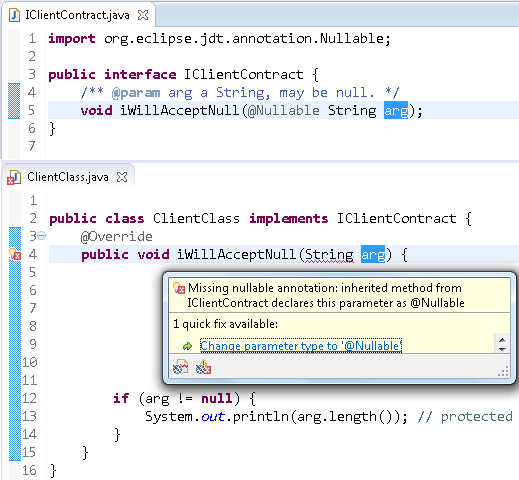
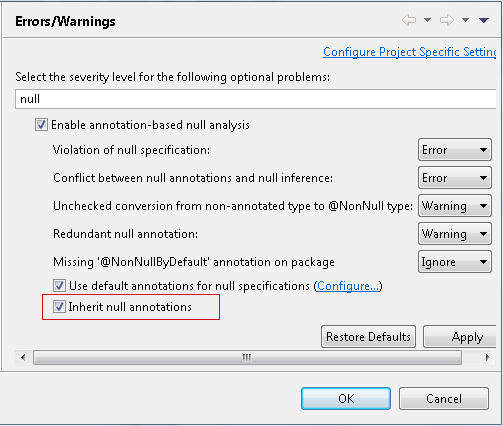
Starting with 4.3M4 this behavior can be changed by selecting the option Inherit null annotations.
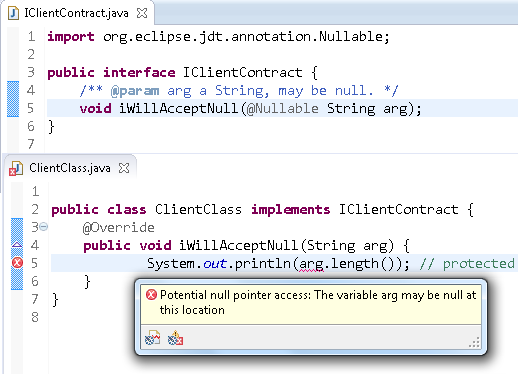
In this new mode the analysis implicitly fills in all missing annotations in overriding methods and uses the annotations from the overridden method. In the above example the error will go away, and analysis concludes that the code is actually safe, which is likely when the contract had already been defined in the javadoc comment and the implementor actually adheres to that contract. If, on the other hand, the implementation does not comply with the inherited specification, new errors will be reported as shown below.
If inheritance of null annotations encounters any ambiguity or conflict the analysis falls back to requiring explicit annotations.

Leak analysis respects well-known utilities JDT's analysis for resource leaks has been made aware of well known utilities from google and apache libraries.

Generally, this analysis looks for close() method calls directly on a resource (any value of type Closeable). However, in order to reduce boilerplate exception handling, several libraries are providing methods like closeQuietly(Closeable). Previously, the analysis would complain about the missing call to close() as shown below:
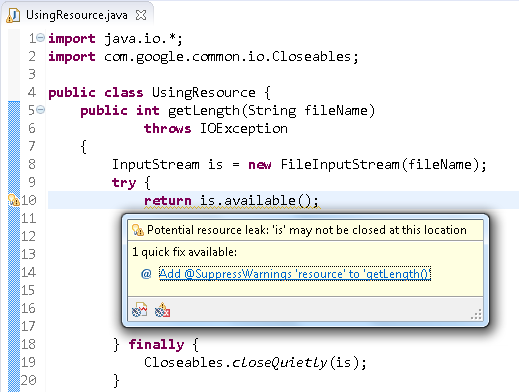
This warning is not relevant and will no longer be reported. To achieve this, JDT now hardcodes a (short) white list of functions that are known to safely close a given resource.
PDE
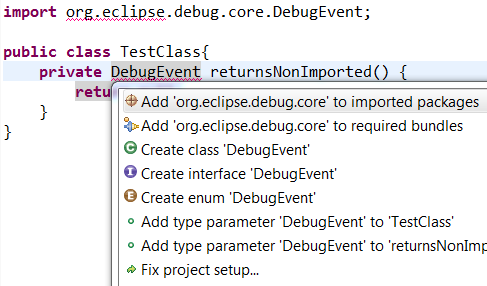
New import package quick fixes New quick fixes are available when you have an unresolved type in a Java file. If the unresolved type can be found in a package exported by a plug-in, a quick fix will be available to add an import package entry to your plug-in manifest. There is also a quick fix to add the exporting plug-in to your manifest's require bundle header.

Import package quick fix on an unresolved type

If a package providing the type is available but the package is not exported by its plug-in, a quick fix will offer to fix the providing plug-in's manifest. Only plug-ins in the workspace can be modified this way.
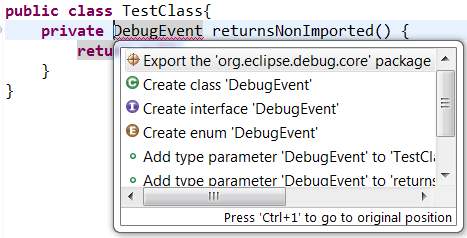
Export package quick fix on an unresolved type that is not exported

The above features are just the ones that are new since the previous milestone build. Summaries for earlier Kepler milestone builds:
