| New high resolution icon |
The Eclipse SDK now has a shiny new icon. The icon is now in high resolution, making
for a much more polished appearance on modern operating systems.

|
| Lightweight refresh enabled by default (4.2 only) |
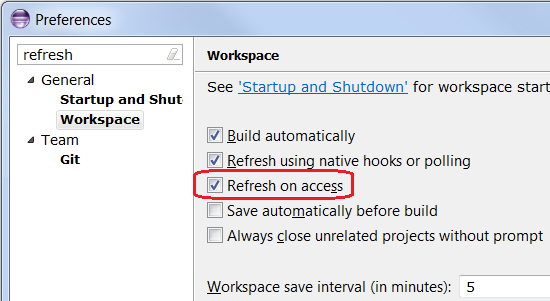
In Eclipse 3.7 a new lightweight refresh mechanism was introduced. Files discovered to be out-of-sync
by the workspace, for example while accessing the file content by an editor,
are automatically asynchronously refreshed. In Eclipse 3.7 and 3.8 you have to enable this yourself
via Preferences > General > Workspace and select Refresh on access.
In Eclipse SDK 4.2 the mechanism is enabled by default.
|
| Support for MacOS X Full Screen |
A new Window > Toggle Full Screen command is now supported on MacOS X Lion.
|
| Trim dragging (4.2 only) |
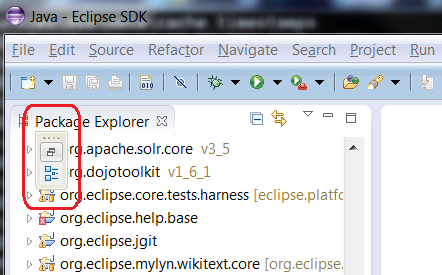
We have finally re-introduced the ability to drag some of the window trim elements around.
For example, you can drag minimized stacks to different edges of the main window.
|
| Trim styling (4.2 only) |
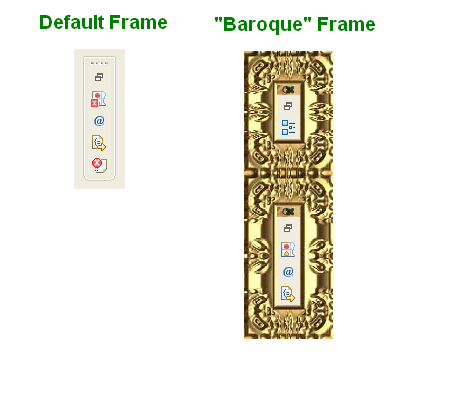
In the new window trim implementation, the drag handle and the frame surrounding the trim are
defined through CSS. Here's an example of what this looks like:
.MToolControl.TrimStack {
	frame-image:  url(./winXPTSFrame.PNG);
	handle-image:  url(./winXPHandle.PNG);
	frame-cuts: 5px 1px 5px 16px;
}
frame-image and handle-image define the images to be used to draw the frame.
The frame-cuts attribute is a set of 4 integer values that are used to divide the frame-image
into specific areas by defining two widths and two heights (the third is just the image size minus the
sum of the other two. This allows us to determine what part of the image to use for the top/right corner.
Here is a more interesting example that illustrates the power this gives to applications to customize their appearance:
|
| CSS-based Theme changed event (4.2 only) |
An OSGi EventAdmin-based event is now raised on theme-change
(bug
369443).
|
| Changes to CSS Extension Points (4.2 only) |
For those providing extensions for the new CSS support,
the extension points for providing property handlers and
element providers have been renamed to
org.eclipse.e4.ui.css.core.propertyHandler and
org.eclipse.e4.ui.css.core.elementProvider
(respectively).
|
| Ant updated to 1.8.3 |
The bundled version of Apache Ant in the platform has been updated to version 1.8.3.
For more information on what is new in Ant 1.8.3 please see the Apache Ant release notes.
|
| Add all known buildfile types to Ant view |
The Buildfile Selection dialog for the Ant view has been updated to allow filtering
for all known kinds of build files rather than just *.xml and build.xml.

|
| Debug tracing |
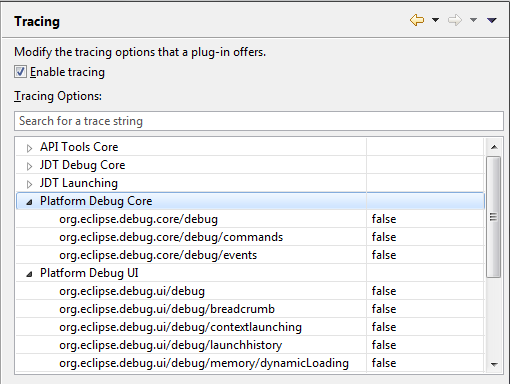
JDT and Platform Debug have added all debug tracing settings to the Tracing preference page where they can be enabled and disabled as needed without restarting.
|
| Breakpoint view sorting |
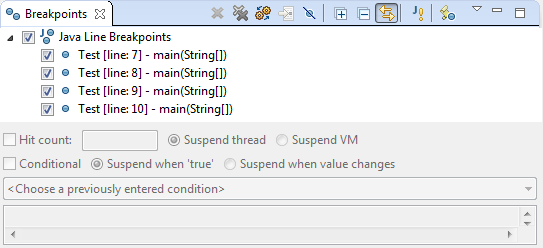
The Breakpoints view now has improved sorting that will take into account any line
numbers that appear in the label and sort accordingly.
|
| JDT |
| Content assist in package-info.java |
Content assist (Ctrl+Space) is now available inside package-info.java, which is used to declare package-level annotations and Javadocs.

|
| Enhanced diagnostics for detection of incomplete switch statements |
JDT now provides additional configurable diagnostics to flag an incomplete switch statement.
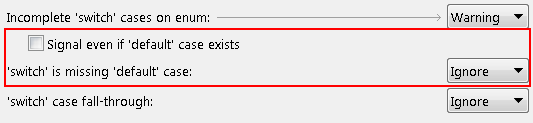
When you enable the option Preferences > Java > Compiler > Errors/Warnings > Switch is missing default case, JDT will flag switch statements with a missing default
case, because such a switch statement can e.g. result in variables left uninitialized.
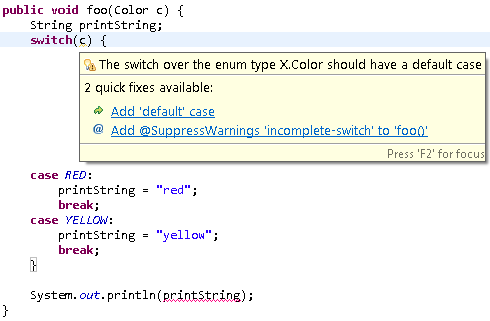
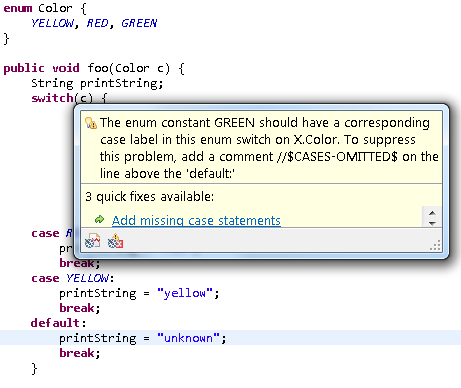
When you enable the sub-option Preferences > Java > Compiler > Errors/Warnings > Signal even if default case exists for the Incomplete switch cases on enum option,
JDT will flag switch statements over an enum type which may have an enum value covered only through a default statement, but not directly through a case
statement. When new enum constants are added, this option will help in detecting the switch statements that do not cover the new value.
|
| Bracket matching improvements in Java editor |
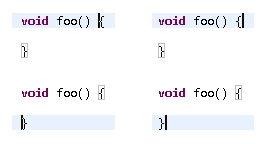
So far, a matching bracket was found when the caret was placed immediately after a bracket. Now,
a matching bracket is found both when the caret is placed either immediately before or immediately after a bracket.
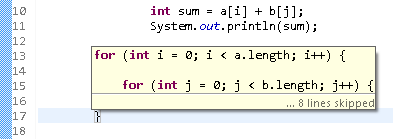
You can hover over a closing curly brace and see the source near the matching opening brace in a hover.
This is helpful when you want to see the code near the start of a long code block. The hover also tells the number of lines in the code block.
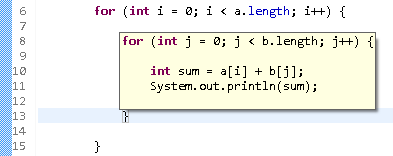
The hover is also useful to temporarily 'highlight' a short code block.
|
| JUnit 4.10 |
The JUnit 4 version shipped with Eclipse has been updated to 4.10.
|
| |
The above features are just the ones that are new since the previous milestone
build. Summaries for earlier Juno milestone builds: