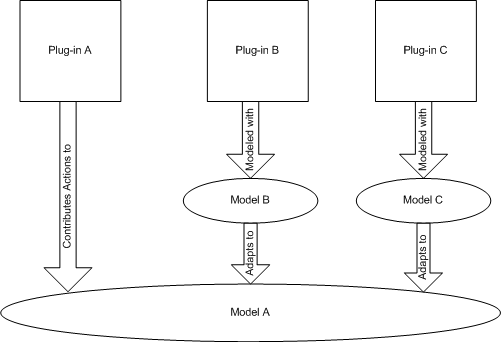
| Types | Descirption |
| Meta-model | A model that includes types whose instances are also types. Meta-models are often used to specify other models. For example, EMF provides a meta-model (ECore) for describing models. |
| Model | A model of a specific application domain. These instances are called meta-objects. A model is the actual data representation for an application. For example, in JDT the model is composed of ICompilationUnit, IJavaProject... The model can be instances of a meta-model or a standalone model (e.g. simply a set of classes and interfaces). |
| User Objects |
Instances of the elements of a model. |
<extensionThis plugin.xml snippet defines an adapter that can adapt instances of MyLogicalElement to ResourceMapping. An adapter factory can adapt the same adaptableType to different types. Simply add another adapter element to the extension point. The adapter factory implementation would be:
point="org.eclipse.core.runtime.adapters">
<factory
class="logicalView.views.AdapterFactory"
adaptableType="logicalView.views.MyLogicalElement">
<adapter type="org.eclipse.core.resources.mapping.ResourceMapping"/>
</factory>
</extension>
public class AdapterFactory implements IAdapterFactory {
  public Object getAdapter(Object adaptable, Class adapterType) {
    if(adaptableinstanceof MyLogicalElement &&
       adapterType == ResourceMapping.class) {
      return new MyLogicalElementResourceMapping(
        (MyLogicalElement)adaptable);
    }
    return null;
  }

  public Class[] getAdapterList() {
    return new Class[] {IResourceMapper.class};
  }
}
A
rule of thumb when deciding what adapters to register, try and adapt to
the most specific type possible. For example, although it is
technically possible to return the IProject for a java IMethod (e.g.
the project that contains the method) the relationship is too vague and
would be best to return the IFile instead.<extensionThe implementation of the action can assume the following:
point="org.eclipse.ui.popupMenus">
<objectContribution
objectClass="org.eclipse.core.resources.mapping.ResourceMapping"
adaptable="true"
id="myaction.id">
<action
label="Do It"
class="myplug.actions.DoItAction"
menubarPath="additions"
id="myaction.id.doit">
</action>
</objectContribution></extension>
IContributorResourceAdapter
An interface was added in Eclipse 2.0 to allow plug-ins to adapt IResource elements
differently when they were used for workbench contributions (see Bug 6247 for a background
discussion). This interface is still honnoured when adapting to IResource by
first checking if an objects adapts to IContributorResourceAdapter then to IResource.
In 3.1, a subinterface IContributorResourceAdapter2 has been added to support
context dependant adaptation to ResourceMappings.
Note: This class is defined in the
IDE plug-in meaning that applications not including the IDE can't use this support.
Problems with IActionFilter
Action filters are designed to allow contributions to filter their visibility
based on a filter queried at runtime. The workbench tries to find an IActionFilter
for an object in the selection by asking the adapted selection if it can adapt
to IActionFilter. This is restrictive since it allows only one implementation
of an IActionFilter per type. Another more flexible approach is to use the new
enablement attribute that was added in 3.0. The following enablement will show
the contribution only if it is shared with a CVS project. The enablement tester
is provived in the contribution instead of via the selection, which makes this
approach more flexible.
<extensionThe property tester would is contributed as follows:
point="org.eclipse.ui.popupMenus">
<objectContribution
objectClass="org.eclipse.core.resources.mapping.ResourceMapping"
adaptable="true"
id="myaction.id">
<enablement>
<test property="org.eclipse.ui.ide.projectPersistentProperty" args="org.eclipse.team.core.repository=org.eclipse.team.cvs.core.cvsnature" />
</enablement>
...
</objectContribution></extension>
<extensionRelated Bugs
point="org.eclipse.core.expressions.propertyTesters">
<propertyTester namespace="org.eclipse.ui.ide" type="org.eclipse.core.resources.mapping.ResourceMapping" class="org.eclipse.ui.internal.ide.model.ProjectPersistentPropertyTester" properties="projectPersistentProperty" id="org.eclipse.ui.ide.projectPersistentPropertyTester" />
</extension>